Black Friday is a strong opportunity to turn customer attention into immediate voucher revenue. For GiveaVoucher retailers, success does not require a complicated campaign. It requires one clear offer, a firm deadline and repeated promotion wherever customers already interact with your business.
This guide explains how to choose your offer and promote it through Facebook, Instagram, email, your website and in-store signage. It also includes practical examples you can adapt and publish quickly.
1. Choose one clear Black Friday offer
Your offer should be easy to understand in a few seconds. Avoid presenting several discounts at once. Choose the promotion that best matches your goal and margin.
- Increase the order value: “Buy a £100 voucher and receive £10 extra value.”
- Reward the purchaser: “Spend £50 on gift vouchers and receive a £10 voucher for yourself.”
- Offer a direct saving: “Save 10% on selected gift vouchers this Black Friday.”
Set a minimum spend where appropriate and apply the promotion only to selected templates or categories if that better protects your margin. State the closing time and any redemption restrictions clearly. If a bonus voucher can only be used during certain dates, include that condition in every version of the offer.
2. Prepare before you promote
Create a branded Black Friday voucher template and configure the promotion in Tapa Office. Check the offer value, qualifying spend, start and finish times, eligible vouchers and customer-facing terms.
Complete a test purchase. Confirm payment, email delivery and redemption all work as expected, then give staff a short explanation of the offer before it goes live.
Finally, copy your direct GiveaVoucher purchase link. Use the same link in every Facebook post, Instagram bio, email, website banner and QR code. Customers should land on the buying page—not your home page, where they have to search again.
3. Promote the offer on Facebook
Facebook works well for reaching existing followers, local customers and people who already know your business. Publish more than once because only a proportion of followers will see each post.
What to publish
- Launch post: explain the offer, qualifying spend and deadline. Add the direct purchase link.
- Reminder post: show what the voucher could be used for and repeat the offer.
- Final-hours post: lead with urgency, state the closing time and link directly to checkout.
- Facebook Story: use a countdown, a strong offer graphic and a link sticker where available.
Example Facebook post
🍔 Bods Burgers Black Friday offer is live! Buy a £50 gift voucher and we’ll send you a £10 bonus voucher for yourself. That’s your next burger sorted. Available online this weekend only. Offer ends Sunday at midnight. Buy now: [GiveaVoucher link]. Terms apply.
Pin the launch post to the top of your Facebook page during the campaign. If budget allows, boost the strongest post to people in your local area and to relevant audiences. Keep the geographic radius realistic for your business and review results daily rather than setting the advert and forgetting it.
4. Turn the offer into an Instagram campaign
Instagram is visual, so make the offer the main message on the image or video. Do not rely on a long caption to explain the promotion.
- Feed post: use a clear Black Friday graphic with the saving or bonus in large text.
- Carousel: slide one shows the offer, slide two explains how it works and slide three gives the deadline and buying instructions.
- Reel: create a short video showing the experience, service or products the voucher can buy. Finish with the offer and deadline on screen.
- Stories: post at launch, 48 hours remaining and final hours. Use a countdown and link sticker.
- Profile: place the direct voucher link in your bio for the full campaign and mention “link in bio” in each caption.
Example Instagram caption
BLACK FRIDAY AT BODS BURGERS 🖤🍔 Buy a £50 gift voucher and get a £10 bonus voucher for yourself. Give someone burgers. Keep a burger for you. Everybody wins. This weekend only—tap the link in our bio to buy. Terms apply.
Use a small number of relevant hashtags rather than a wall of generic tags. Include your business name, town or region and the type of experience or product you sell.
Worked example: Bods Burgers
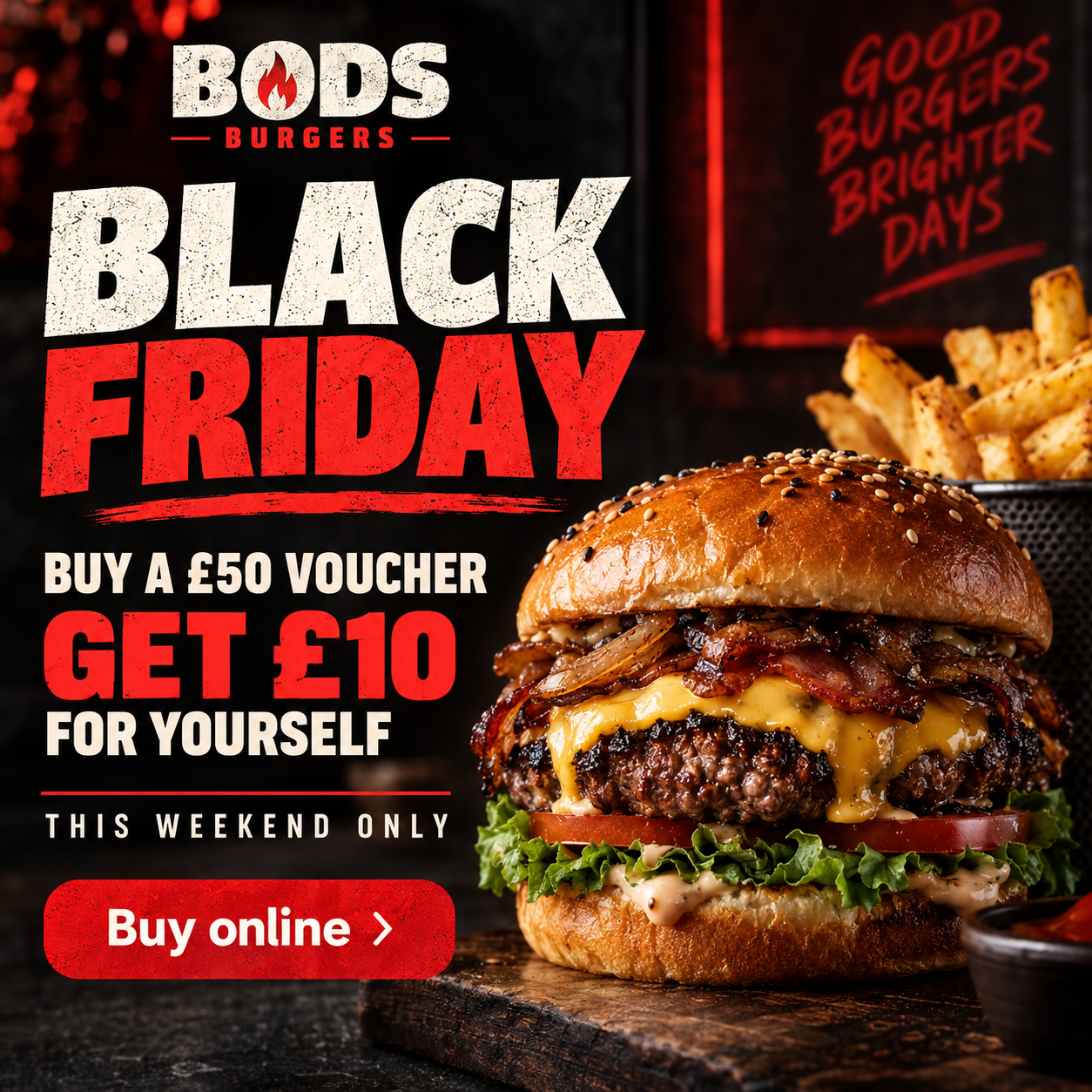
Here is how a fictional restaurant called Bods Burgers could turn one offer—buy a £50 voucher and receive a £10 bonus voucher—into a short sequence of social posts.
Post 1: Campaign launch
Suggested visual: the main Black Friday offer graphic shown above.
🚨 BLACK FRIDAY HAS LANDED AT BODS BURGERS 🚨 Buy a £50 Bods Burgers gift voucher and get a £10 bonus voucher for yourself. Treat someone to their next burger—and keep a little something for you. Available online until Sunday at midnight: [GiveaVoucher link]. Terms apply.
Post 2: Mid-campaign reminder
Suggested visual: a close-up photo or short video of the restaurant’s most popular burger, with a small Black Friday offer banner.
Know someone who would choose burgers over socks? 🍔 Buy them a £50 Bods Burgers voucher this Black Friday and you’ll receive a £10 bonus voucher for yourself. Order online before Sunday at midnight: [GiveaVoucher link]. Terms apply.
Post 3: Final-hours reminder
Suggested visual: a simple countdown Story using “Ends tonight” as the largest text, followed by the offer and a link sticker.
FINAL HOURS ⏰ Our Black Friday voucher offer ends at midnight. Buy a £50 Bods Burgers gift voucher and get £10 for yourself. Tap here to buy before it’s gone: [GiveaVoucher link]. Terms apply.
The offer stays exactly the same in every post, but the angle changes: the first announces it, the second makes the gift relatable and the third creates urgency. This consistency makes the campaign easier for customers to understand and for staff to explain.
5. Promote Black Friday vouchers in store
Your current customers already know your business and are often the easiest people to convert. Make the offer visible before they reach the till and give them a simple way to buy from their phone.
- Window poster: use a short headline that can be read from outside, such as “Black Friday: Buy £50, get £10 extra”.
- Counter card: place a smaller version beside the till with a QR code linking directly to your GiveaVoucher page.
- Table talkers or menu inserts: use them in cafés, restaurants, salons and other seated environments.
- Changing-room or treatment-room signage: place reminders where customers have time to notice them.
- Receipts and bags: add a short message or printed slip with the offer, deadline and QR code.
- Digital screens: rotate a simple Black Friday slide on customer displays or screens already used in the business.
Keep signage simple: one offer, one deadline and one QR code. Test the QR code from a normal viewing distance before printing. Add a short web address below it for customers who prefer to type the link.
Give staff one sentence to use
“Just to let you know, our Black Friday voucher offer is available online until [day]—the QR code here takes you straight to it.”
The prompt should feel helpful, not scripted or pushy. Make sure every team member knows the offer and can explain the main terms correctly.
6. Support the campaign with email and your website
Send three focused emails: a launch, a reminder and a final-hours message. Use a subject line that states the benefit, such as “Black Friday: Get £10 extra with a £50 voucher”. Keep the email short and use one prominent Buy a voucher button linked directly to GiveaVoucher.
Your website
Add a Black Friday banner to your home page and a prominent voucher link in your main navigation. If you use a pop-up, show it once rather than on every page. Check the banner and button on a mobile phone, where many social media visitors will arrive.
Google Business Profile and other listings
Publish the offer as a business update and ensure your website link is current. This helps customers who discover or check your business through local search during the campaign.
7. A practical Black Friday campaign schedule
- Three to four weeks before: choose the offer, confirm the margin, configure the promotion and prepare artwork.
- Two weeks before: order signage, create the QR code, brief staff and test the full purchase journey.
- One week before: add in-store signage and tease the upcoming offer on Facebook, Instagram and email.
- Launch day: update the website, publish social posts, send the launch email and check the live offer yourself.
- During the campaign: share reminders, respond quickly to questions and confirm links remain active.
- Final day: publish a clear final-hours post and Story, then send the last email to customers who have not purchased.
- After closing: remove promotional signage and website banners promptly so customers do not see an expired offer.
8. Measure what worked
Review the campaign when the season ends so next year’s plan is based on evidence. Useful measures include:
- total voucher revenue;
- number of vouchers sold;
- average voucher value;
- sales by day and hour;
- which templates and values sold best;
- promotion cost compared with additional revenue;
- website clicks from Facebook, Instagram and email;
- reach, engagement and advertising cost where applicable.
Use separate tracked links for Facebook, Instagram and email where possible. For printed material, create a dedicated QR code. The goal is not simply to know that sales increased, but to identify which channel and message generated purchases.
Keep the campaign simple and visible
A strong Black Friday voucher campaign has one recognisable offer, one direct buying link and one clear deadline. The practical work is repetition: show the offer on Facebook, Instagram, your website, email and throughout the premises so customers cannot easily miss it.
With GiveaVoucher, retailers can create branded voucher templates, configure targeted promotions and sell online around the clock. Prepare early, test everything and keep the terms consistent across every channel.
Get your Black Friday voucher campaign ready
Already using GiveaVoucher? Set up your Black Friday template and promotion in Tapa Office, then test the complete customer journey before launch.